
Imagine losing months or even years of critical business data in an instant. Hardware failures, human error, and ransomware attacks can strike at any time, often without warning. When a ransomware strikes, paying the ransom may seem like the quickest way to recover access to your data. Yet according to Veeam’s 2024 research, only one in three companies that paid the ransom were actually able to retrieve their data. This underscores a critical truth: having a solid data backup strategy is no longer optional but essential.
Understanding Data Backup
Data Backup is the process of creating secure copies of an organization’s critical files, applications, and systems, for storage and future restoration. These copies, known as backup data, are generated from original information to ensure that a duplicate version is available for recovery when needed.
Data Backup allows data to be restored in the event of unexpected data loss, system failure, or data corruption. The backup data is typically created and maintained through scheduled or automated processes, depending on the organization’s requirements and system configuration.
What Puts Your Data at Risk
Hardware Failure
When physical components such as servers or storage devices stop functioning, leading to inaccessible or lost data. For example, a sudden server crash can prevent access to critical business files stored on it.
Human Error
Unintentional mistakes made by users that result in data being deleted, altered, or misplaced. For example, an employee accidentally overwrites the wrong file.
Cyber Attacks
External malicious attempts to disrupt, steal, or damage data and systems. These can take many forms, including ransomware that encrypts files and demands payment, phishing attacks that trick users into revealing sensitive information, malware infections that compromise systems, and denial-of-service (DoS) attacks that overload systems and cause service disruptions.
Malicious Insiders
Authorized users who intentionally misuse their access to compromise or alter data. For example, an angry staff member deleting or modifying confidential files without approval.
Natural Disasters or Power Outages
Unexpected environmental or infrastructure events that disrupt normal system operations and can result in data loss or corruption. For example, a sudden power outage may force systems to shut down abruptly, interrupting active processes, and affecting stored or in-progress data.
Why Businesses Need a Strong Data Backup Strategy
Without a proper data backup strategy, businesses risk permanently losing important files, records, and operational data when unexpected incidents occur. This can lead to prolonged downtime, disrupted operations, and delays in daily business activities. Beyond operational setbacks, data loss can also damage customer trust and harm a company’s reputation, especially when sensitive or business-critical information is compromised. In regulated industries, organizations may even face legal or compliance penalties if essential data cannot be recovered.
These risks have become even more serious with the rise of ransomware attacks. In the case of UK transport company KNP Logistics, a major ransomware attack left the company unable to recover the critical data and systems required to keep operations running. The impact was so devastating that KNP Logistics was ultimately forced to shut down entirely, resulting in the loss of hundreds of jobs.
As cyber threats and unexpected disruptions continue to rise, having a reliable data backup strategy is more important than ever. Effective backup solutions enable businesses to recover lost or corrupted files quickly, helping to reduce downtime and maintain business continuity. They also support compliance with industry regulations by ensuring essential information remains protected and recoverable. Ultimately, a strong data backup strategy provides businesses with greater confidence that their valuable data remains safe, secure, and accessible when it matters most.
Best Practices for Data Backup
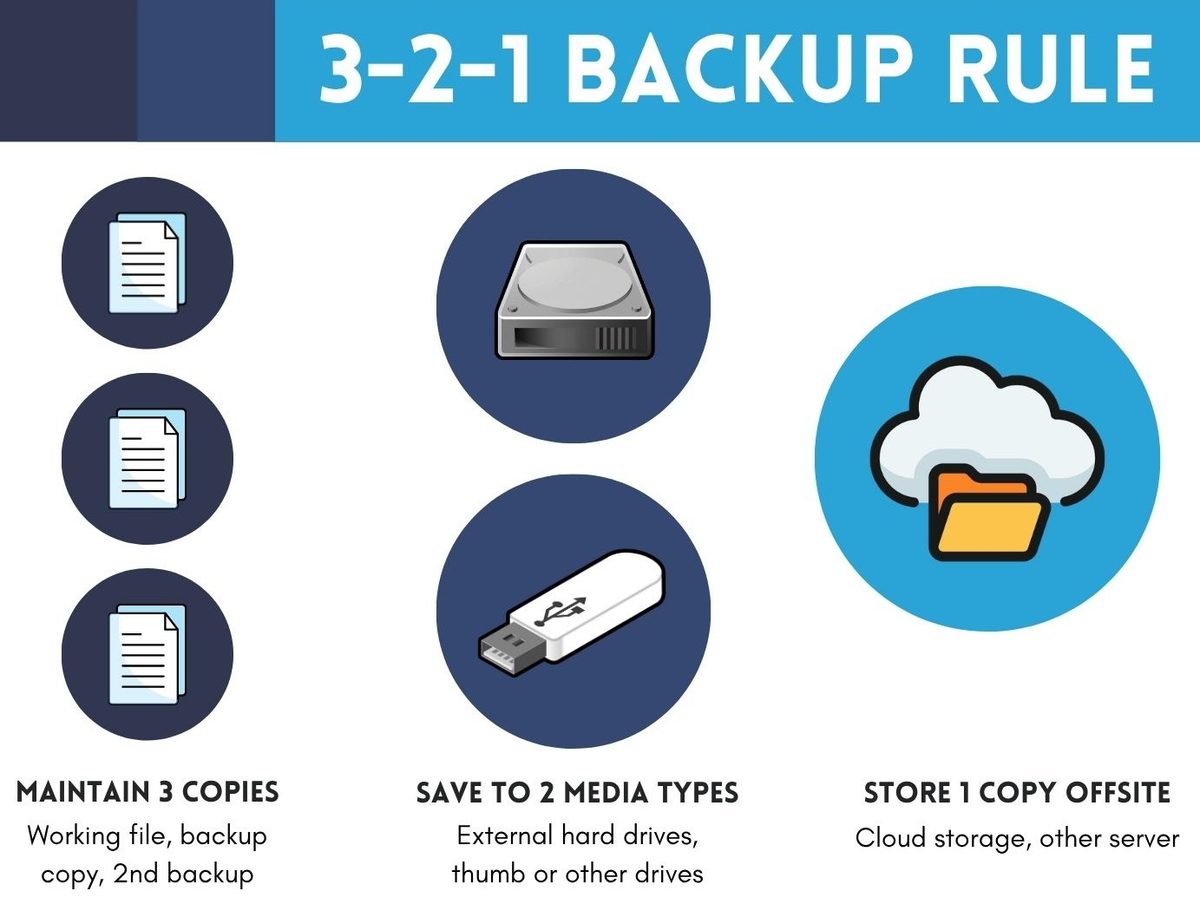
Follow the 3-2-1 rule
Maintain 3 copies of your data, store them on 2 different types of media, and keep 1 copy offsite or in the cloud for stronger protection against data loss.
Schedule regular data backups
Set data backup processes to run hourly or daily based on your business needs to ensure important files are always up-to-date and recoverable.
Test backups regularly
Conduct routine data backup testing to ensure that data and systems can be restored quickly and successfully when needed.
Encrypt sensitive data for security
Protect confidential business information with encryption to reduce the risk of cyber threats, data breaches, and ransomware incidents.
Types of Data Backup Solutions
Businesses can build a stronger and more resilient data protection strategy with different types of backup solutions available:
1. Local Data Backup
Local data backup stores business data on on-premises devices such as external hard drives or Network Attached Storage (NAS). This enables faster access and recovery of important files within the organization’s internal environment.
2. Offsite Data Backup
A strong business continuity plan requires critical business data to be backed up to a secondary location. Offsite data backup keeps copies of data in a separate remote location, either through physical storage or managed service providers. This provides added protection against unexpected disruptions, system failures, or natural disasters.
3. Cloud Backup
Cloud backup is a data backup solution that securely stores business data in the cloud instead of relying solely on physical on-premises storage. For businesses without a secondary data centre or the resources to operate one cost-effectively, cloud backup provides a practical and reliable option for maintaining secure offsite backups.

Cloud backup offers greater flexibility, scalability, accessibility, and cost-effectiveness, making it suitable for businesses of all sizes. Many organizations adopt a hybrid backup approach that combines local backups with cloud backup solutions to benefit from both fast local recovery and secure offsite protection, helping to strengthen business continuity while minimizing downtime.
Key cloud backup features include:
- Automated and scheduled backups
- Data replication and redundancy
- Backup for virtual servers, physical servers, PCs, and laptops
- Secure offsite backups over the internet
- Encryption to protect backed-up data
- Backup verification and monitoring capabilities
- Faster recovery of data and systems following disruptions
These features help businesses maintain secure and recover copies of data separate from the primary environment, strengthening protection against cyber threats such as ransomware and enabling faster recovery from disruptions.
Choosing the Right Data Backup Strategy for Your Business
Selecting the right data backup strategy depends on factors such as business size, the importance of critical data, and security needs. With the wide range of data backup solutions available today, choosing the most suitable approach can be challenging. An experienced provider like Adventus plays a critical role in helping organizations implement a data backup strategy that supports both operational needs and long-term business continuity.
Why Engage Adventus for Your Data Backup Strategy
Adventus delivers reliable data backup solutions designed to safeguard critical business information with confidence. Backed by strong technical expertise and trusted technology partners, Adventus provides strategic guidance, fully managed implementation, proactive monitoring, and dedicated support to ensure data is consistently protected and recoverable.
In addition to local and offsite backup solutions, Adventus also provides Adventus Cloud Backup, a dedicated cloud-based solution that enables organizations to securely protect virtual servers, physical servers, laptops, and PCs through a centralized platform. Continuous backup monitoring and validation, robust encryption, and disaster recovery support deliver end-to-end managed protection, ensuring data remains secure, accessible, and recoverable when needed.
Reach out to Adventus today to strengthen your business resilience.